By Pablo Bravo
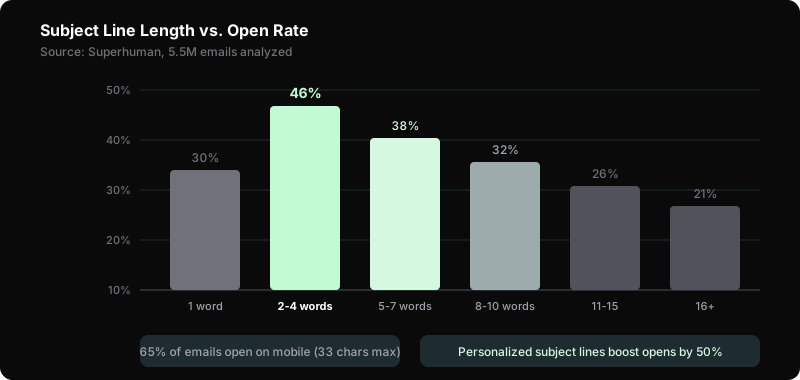
Your subject line decides everything. It doesn't matter how good your email is if nobody opens it. A study of 5.5 million emails found that 2-4 word subject lines hit 46% open rates — and performance drops sharply after 7 words. Personalized subject lines pull 50% more opens than generic ones.
Here's the problem: 65% of emails now open on mobile (Litmus, 2025). Mobile screens show 30-43 characters before cutting off. If your subject line doesn't land in those first few words, it's invisible.
This guide gives you 15 proven formulas with fill-in-the-blank templates. Each one includes examples and the psychology behind why it works. Steal them. Test them. Find the 3-4 that work best for your audience.
For full email marketing strategy, start with our email marketing guide for small business. These formulas also power your welcome email sequence and your cold email outreach.
Key Takeaways
- Subject lines of 2-4 words hit 46% open rates; keep under 50 characters for mobile
- Personalized subject lines boost opens by up to 50%
- Test one variable at a time — subject line A vs B, same email body
- Avoid ALL CAPS, spam trigger words, and clickbait without delivery
What Makes a Subject Line Work in 2026?
Three forces decide whether a subject line gets opened in 2026: brevity, specificity, and mobile-first formatting. A Superhuman analysis of 5.5 million emails found that 2-4 word subject lines hit 46% open rates, with performance dropping sharply after seven words [Superhuman 2025]. Mobile makes brevity non-negotiable: 65% of emails now open on phones [Litmus 2025], and most clients cut subject lines off near 33-43 characters. Campaign Monitor found that 33 characters or fewer, roughly six words, is the only length that displays in full across every mobile client [Campaign Monitor 2026]. Specificity does the rest. Subject lines that reference a subscriber's actual behavior beat generic personalization by about 2x. One more shift matters: Apple's Mail Privacy Protection inflates reported opens, so click-through rate is now the honest signal. A strong line earns the open and the click.

Behavioral personalization beats name-merge tags because it proves you're paying attention. Three data points are enough to start: last product viewed, last link clicked, and days since last open. "The pricing page you checked twice" lands harder than any first-name merge. "Your abandoned cart" or "The SEO fix you asked about" outperform generic "Hey [Name]" lines by roughly 2x.
The same brevity rule applies whether you're writing a broadcast newsletter or a one-to-one cold email, though the goals differ. Newsletters compete for attention in a crowded inbox. Cold emails compete for a reply from a stranger. Both die past the first few words on mobile.
15 Formulas That Get Opens
The 15 formulas below map to the triggers that make people open email: curiosity, self-interest, urgency, social proof, and identity. Each is a fill-in-the-blank template you can adapt in under a minute, tested against real inbox behavior. No single formula wins for every list. The Superhuman study of 5.5 million emails showed short, specific lines consistently beat clever ones [Superhuman 2025], so favor formulas that stay under 50 characters. Treat this as a menu, not a checklist. Pick three or four that fit your voice, then rotate them so subscribers never see the same pattern twice in a row. A B2B SaaS list responds to contrarian and how-to angles. A creator newsletter leans on personal-story and curiosity-gap lines. Match the formula to the moment: launches want urgency, onboarding wants specificity, re-engagement wants honesty. Copy the templates, swap in your details, and start testing this week.
One rule keeps you from overthinking it: write the email first, then the subject line. When you know the single most useful thing inside, the formula picks itself. A step-by-step post fits Number + Benefit. A case study fits Social Proof. A deadline fits FOMO. Reverse the order and you'll write a clever line the email can't back up.
1. The Curiosity Gap
Template: "The [topic] mistake [audience] keeps making"
Examples:
- "The pricing mistake costing you subscribers"
- "The email habit killing your open rates"
Why it works: Creates a knowledge gap the reader needs to close. Not clickbait — it implies specific, useful information inside. The gap only works if the email actually names the mistake in the first line.
2. Number + Benefit
Template: "[Number] ways to [achieve specific result]"
Examples:
- "3 ways to reduce churn this week"
- "7 free tools to grow your email list"
Why it works: Numbers set expectations. The reader knows exactly how much content to expect. Odd numbers outperform even numbers in testing, and small numbers (3-7) beat large ones because they feel finishable.
3. How-To
Template: "How to [achieve result] without [common obstacle]"
Examples:
- "How to get 100 subscribers without ads"
- "How to write emails faster without templates"
(List-growth tactics live in our guide on growing a newsletter from 0 to 1,000 subscribers.)
Why it works: Promises a solution and removes the objection in the same line. Direct and scannable on mobile. The "without" clause does the heavy lifting: it names the exact reason the reader hasn't acted yet.
4. The Question
Template: "Are you [making common mistake / missing opportunity]?"
Examples:
- "Are you sending emails at the wrong time?"
- "Is your welcome sequence losing subscribers?"
Why it works: Questions trigger a mental response. The reader has to answer — and opens the email to check if they're right. Yes/no questions where the honest answer is "I'm not sure" convert best.
5. Fear of Missing Out
Template: "[Time limit]: [opportunity that expires]"
Examples:
- "48 hours: the template vault closes Friday"
- "Last chance to join the live workshop"
Why it works: Scarcity drives action. But only use real deadlines. Fake urgency trains subscribers to ignore you, and repeated "last chance" lines that never expire teach readers your deadlines are fiction.

6. Personal Story
Template: "How I [went from X to Y]"
Examples:
- "How I grew from 0 to 1,000 subscribers"
- "How I lost my best client (and what I learned)"
Why it works: Stories activate different brain pathways than information. The reader connects emotionally before they evaluate logically. Concrete numbers ("0 to 1,000") make the story feel true instead of staged.
7. Contrarian Take
Template: "Why [common advice] doesn't work"
Examples:
- "Why posting daily on LinkedIn is a waste"
- "Why your email list size doesn't matter"
Why it works: Challenges beliefs the reader holds. They open to see if you can defend the claim. High engagement, high reply rates. (Pair this angle with a strong social media marketing plan so the email and your feed tell the same story.)
8. Social Proof
Template: "How [name/company] [achieved specific result]"
Examples:
- "How Buffer grew to 100K subscribers"
- "What Sarah did to hit $5K/month from email"
Why it works: Third-party proof is more credible than self-promotion. Real names and specific results signal authentic data. A named person outperforms a faceless "one founder" every time.
9. Time-Sensitive
Template: "[Result] in [specific timeframe]"
Examples:
- "Double your open rate in 7 days"
- "Write your welcome sequence in one afternoon"
Why it works: Timeframes make the result feel achievable. The more specific, the more believable. "In one afternoon" beats "quickly" because the reader can picture the block on their calendar.
10. The "Don't Do X"
Template: "Don't [common action] until you read this"
Examples:
- "Don't send another newsletter until you read this"
- "Don't buy email software until you see this comparison"
Why it works: Negative framing stops the scroll. It implies the reader is about to make a costly mistake — and you can prevent it. Works best right before a decision the reader is already weighing.
11. One-Word
Template: "[Single provocative word]"
Examples:
- "Unsubscribed."
- "Really?"
Why it works: Extreme brevity stands out in a crowded inbox. Use sparingly — once a quarter maximum. Overuse destroys the effect, and a one-word line with a weak email inside burns trust fast.
12. Emoji + Short
Template: "[Emoji] [2-3 word hook]"
Examples:
- "New template inside"
- "Your email audit"
Why it works: A single emoji adds visual contrast in a text-heavy inbox and can lift open rates when it matches the message. One emoji max. Two or more reads as spam and cancels the benefit.
13. List Preview
Template: "[Topic 1], [Topic 2], and [Topic 3]"
Examples:
- "Subject lines, segmentation, and a free tool"
- "Pricing, churn, and a case study"
Why it works: Previews the value inside. If any one topic interests the reader, they open. Three items is the sweet spot — two feels thin, four gets truncated on mobile.
14. The Challenge
Template: "I challenge you to [specific action]"
Examples:
- "I challenge you to send 5 cold emails today"
- "Try this one thing before your next campaign"
Why it works: Activates the reader's competitive instinct. Works especially well for action-oriented founder audiences who'd rather do something than read about it.
15. Re-engagement
Template: "Still interested in [topic]?"
Examples:
- "Still interested in growing your email list?"
- "Should I keep sending these?"
Why it works: Direct and honest. For dormant subscribers, this honesty earns more respect (and re-engagement) than pretending nothing changed. It also cleans your list: non-openers who ignore it can be pruned.
How to A/B Test Your Subject Lines
A/B testing subject lines means sending two versions to small slices of your list, then sending the winner to everyone else. Mailchimp recommends at least 1,000 subscribers per variant for statistically reliable results [Mailchimp 2026], because smaller samples produce noise that looks like signal. Under that threshold, don't fake precision. Instead, alternate formulas week over week and log open and click rates in a spreadsheet; after roughly 20 sends, real patterns emerge. Test one variable at a time, subject line A versus B, with the same email body, or you'll never know what caused the change. Send each version to 10% of your list, wait two to four hours, then send the winner to the remaining 80%. Measure click-through rate, not just opens, since Apple's Mail Privacy Protection inflates open data. The goal isn't one winning line. It's a rotation of three or four formulas your audience reliably opens.

Don't guess which formula works for your audience. Test.
The basics:
- Pick one variable to test (subject line A vs B — same email body)
- Send each version to 20% of your list (10% each)
- Wait 2-4 hours for results
- Send the winner to the remaining 80%
Sample size matters. You need at least 1,000 subscribers per variant to get reliable data. With smaller lists, just alternate formulas week-over-week and track results in a spreadsheet. If you're still building your list, our email marketing guide for small business covers list growth before you optimize sends.
What to test first:
- Question vs statement (Formula 4 vs Formula 2)
- Short vs long (Formula 11 vs Formula 13)
- With emoji vs without (Formula 12 vs any other)
Test in that order because length and framing move open rates more than any single word choice. After 20 tests, you'll know which 3-4 formulas consistently win for your audience. Those become your rotation, and you retest them once a quarter as your list changes.
MailerLite, Kit, and Brevo all offer A/B testing on their free tiers. No excuse not to test.
What to Avoid
Five subject line habits quietly destroy deliverability and trust: ALL CAPS, spam trigger words, clickbait without payoff, generic numbering, and fake reply prefixes. Spam-flag words like "free" and "act now" weight against your email in filtering algorithms, and misleading "RE:" or "FWD:" prefixes trigger permanent unsubscribes [Campaign Monitor 2026]. None of these get you blocked outright, but each erodes the sender reputation that decides whether you reach the inbox or the spam folder. The pattern is the same across all five: a short-term open bought at the cost of long-term trust. Clickbait like "You won't believe this" works exactly once, then subscribers learn to ignore you. "Newsletter #47" tells the reader nothing about the value inside. The fix is simple. Promise something specific and true, then deliver it. Every subject line either builds or spends the trust that makes your next email openable.
ALL CAPS. "HUGE ANNOUNCEMENT" triggers spam filters and reader skepticism. It signals desperation.
Spam trigger words. "Free," "act now," "limited time," "buy now" — these aren't automatically blocked, but they weight against you in filtering algorithms. Use them sparingly and only when honest.
Clickbait without delivery. "You won't believe what happened" only works once. If the email doesn't deliver on the promise, the reader will never trust your subject lines again.
Newsletter numbering. "Newsletter #47" tells the reader nothing about the value inside. Nobody subscribes because they want "Newsletter #47." Name the single best thing inside instead.
Misleading RE: or FWD: prefixes. Adding "Re:" to fake a conversation thread is deceptive. It gets opens once and unsubscribes forever.
For welcome email sequences, specific delivery subject lines ("Here's your [resource]") outperform clever alternatives every time. The subscriber just gave you their address for a reason. Name that reason and get out of the way.
Frequently Asked Questions
What's the ideal subject line length?
Keep subject lines under 50 characters (6-10 words). A study of 5.5 million emails found 2-4 word subject lines hit 46% open rates. On mobile, only 33 characters display fully across all clients. Shorter beats clever every time.
Do emojis in subject lines actually help?
Emojis can boost open rates when used strategically — but one emoji maximum. Overuse signals spam. Test one emoji vs no emoji on your list. Results vary dramatically by audience. B2B audiences generally respond less to emojis than B2C.
How often should I A/B test subject lines?
Every send, if your list is large enough (1,000+ subscribers per variant). With smaller lists, alternate formulas weekly and track results in a spreadsheet. After 20 tests, you'll have clear patterns. Focus on click-through rate as your primary metric, not open rate.
Does personalization really increase open rates?
Personalized subject lines boost opens by up to 50% (Campaign Monitor). But "[First Name], check this out!" isn't true personalization. Reference their behavior, purchase history, or specific interest. "The SEO fix you asked about" outperforms "Hey Sarah" by a wide margin.
What time should I send emails for the best open rates?
GetResponse's 2024 benchmarks show Tuesdays at 10 AM local time consistently produce the highest open rates. But your audience may differ. Test send times the same way you test subject lines — one variable at a time.
Sources
- Superhuman, "Email Subject Line Statistics," retrieved 2026-06-29, https://blog.superhuman.com/email-subject-line-statistics/
- Litmus, "State of Email Reports 2025," retrieved 2026-06-29, https://www.litmus.com/state-of-email-reports
- Campaign Monitor, "Email Subject Line Length," retrieved 2026-06-29, https://www.campaignmonitor.com/blog/email-marketing/best-email-subject-line-length/
- GetResponse, "Email Marketing Benchmarks," retrieved 2026-06-29, https://www.getresponse.com/resources/reports/email-marketing-benchmarks
- Omnisend, "Email Marketing Statistics," retrieved 2026-06-29, https://www.omnisend.com/blog/email-marketing-statistics/
- Mailchimp, "Best Practices for Email Subject Lines," retrieved 2026-06-29, https://mailchimp.com/help/best-practices-for-email-subject-lines/