By Pablo Bravo
97% of consumers read reviews before choosing a local business (BrightLocal, 2026). For restaurants, the stakes are even higher: 46% of diners say they won't eat at a restaurant without reading reviews first. And a single star increase on Google can boost your revenue by 5-9% [WiserReview 2026].
Google hosted 71% of all online reviews in 2026 [QuickFeedback 2026]. Your Google Business Profile is the first thing potential customers see — before your website, before your social media, before your menu. If you have fewer reviews than the restaurant across the street, you're losing customers before they even consider your food.
This guide covers 7 ways to ask for reviews without being awkward, templates for responding to every type of review, and Google Business Profile optimization. Copy-paste templates included.
This is part of our restaurant marketing series. For social media tactics, see our restaurant social media ideas. Reviews compound when you pair them with a steady email follow-up system and a consistent small-business social media presence.
Key Takeaways
- 97% of consumers read reviews before choosing a local business
- A 1-star increase on Google boosts restaurant revenue 5-9%
- 73% of consumers only trust reviews from the last 30 days
- Businesses that respond to all reviews see up to 18% higher revenue
Why Do Google Reviews Matter More Than Ever?
Google reviews directly impact your restaurant's revenue and discoverability. BrightLocal's 2026 Local Consumer Review Survey found that 41% of consumers "always" read reviews before choosing a local business — up from 29% the year before. 81% use Google specifically.

For local SEO, reviews account for approximately 10% of ranking factors (Moz). Businesses ranking in the top 3 local search positions have an average of 47 reviews. If you're sitting at 12 reviews and your competitor has 85, they're showing up first — regardless of whose food is better.
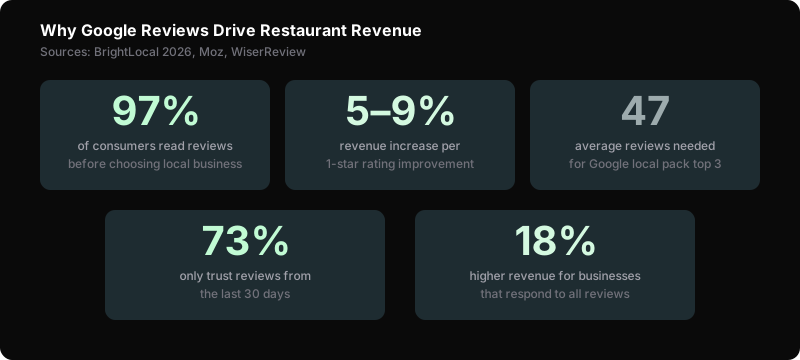
Recency matters too. 73% of consumers only trust reviews from the last 30 days. A restaurant with 200 reviews from 2024 and nothing recent looks abandoned. You need a steady stream of fresh reviews, not a one-time push.
And here's the revenue impact: businesses that respond to all reviews see up to 18% higher revenue than those that don't respond. Responding signals that you care — and customers notice.
How Many Reviews Do You Actually Need?
Restaurants need at least 47 Google reviews to compete in the local pack, and the ideal star rating is 4.2-4.8, not a perfect 5.0. BrightLocal's 2026 survey found that consumers distrust perfect scores, viewing them as fake, while businesses in the 4.2-4.8 range earn more clicks and foot traffic.
The "optimal" rating isn't 5.0 stars. It's 4.2-4.8. BrightLocal's research shows that consumers trust ratings in this range more than a perfect 5.0 — because a perfect score feels fake.
Review Targets by Stage
| Stage | Target Reviews | Target Rating | Priority |
|---|---|---|---|
| New restaurant (0-6 months) | 20+ reviews | 4.0+ | Get volume first |
| Established (6-24 months) | 50+ reviews | 4.2-4.8 | Maintain steady flow |
| Mature (2+ years) | 100+ reviews | 4.3-4.8 | Focus on recency |
The magic number for the local pack (top 3 Google Maps results): 47 reviews. Hit that benchmark and you're competitive. Under 20 reviews, you're essentially invisible in local search, a gap no amount of great food fixes without a solid restaurant marketing plan.
7 Ways to Ask for Reviews Without Being Awkward
Simply asking for a review works. 70% of consumers will leave a review when asked, according to BrightLocal (2026). The challenge isn't willingness, it's timing and delivery. These seven methods put the ask in front of customers at the right moment, using the right channel, without feeling pushy.
1. QR Code at Checkout
Place a QR code on the check presenter or counter that links directly to your Google review page. Add a simple line: "Enjoyed your meal? Leave us a review." Free QR code generators: QR Code Generator or Google's built-in review link.
How to get your direct review link: In Google Business Profile, go to "Ask for reviews" — Google gives you a short link that opens directly to the review form.
2. Follow-Up Text After Reservation
If you collect phone numbers through reservation systems, send a text 2 hours after the reservation time:
"Hi [Name], thanks for dining with us tonight at [Restaurant]! If you enjoyed it, a quick Google review means a lot to our team: [link]"
Keep it one message. No follow-ups. No nagging.
3. Receipt Link
Print your Google review short link on every receipt. Bottom of the receipt, small text: "Tell us how we did: [short URL]". Costs nothing to implement.
4. Staff Verbal Ask (Script)
Train your front-of-house team with a natural script:
"I'm glad you enjoyed everything tonight. If you have 30 seconds, a Google review really helps small restaurants like ours. We appreciate it either way."
When to ask: After the customer has complimented the food or experience. Never ask when they're rushing out.
5. Email Follow-Up for Catering/Events
After catering orders or private events, send a personalized email. If you don't have an email flow yet, our welcome email sequence guide shows how to set one up:
Subject: Thanks for choosing [Restaurant] for your [event type]
Hi [Name],
We loved hosting your [event]. If the food and service met your expectations, a Google review would mean a lot: [link]
And if anything wasn't perfect, hit reply — I'd rather hear it directly so we can make it right.
[Your Name], Owner
6. Social Media CTA
Once a month, post a simple ask on Instagram/Facebook. (For a full content calendar, see our restaurant social media ideas.)
"If you've eaten with us recently, we'd love to hear about it on Google. Your reviews help other food lovers find us. Link in bio."
Don't overdo this. Once a month maximum.
7. Review Card with Takeout Orders
Include a small card with every takeout and delivery order:
"Thanks for ordering from [Restaurant]! Loved your meal? A Google review helps us keep cooking: [QR code]"
This captures the segment of customers who never dine in.
How to Respond to Every Review
Responding to every Google review directly boosts revenue. 89% of consumers prefer businesses that respond to reviews, and restaurants that reply to all reviews earn up to 18% higher revenue than those that don't, according to BrightLocal (2026). The response itself becomes a trust signal for every future reader.
Responding to reviews isn't optional. 89% of consumers prefer businesses that reply. Your best reviews are also marketing assets — repurpose them as testimonials on your website and sales materials. Here are templates for every scenario.
Positive Reviews (5 stars)
"Thanks, [Name]! Really glad you enjoyed the [specific dish if mentioned]. We'll pass the kind words to [chef/server name]. See you again soon."
Key: Personalize. Reference something specific from their review. Never copy-paste the same response to every review.
Positive Reviews (4 stars)
"Thanks for the kind words, [Name]! Glad you enjoyed it. If there's anything we could've done to make it a 5-star experience, we'd love to hear — just reply here or ask for a manager next visit."
Negative Reviews (Legitimate)
"Hi [Name], thank you for sharing this. I'm sorry your experience didn't meet our standards — that's not what we aim for. I'd like to make this right. Could you contact me at [email/phone] so we can discuss? — [Your Name], Owner"
Key: Apologize, take it offline, show the owner cares. Never get defensive. Never argue in public.
Fake or Spam Reviews
"We don't have any record of this visit. If you did dine with us, please contact us at [email] so we can look into this. We take all feedback seriously."
Then flag the review in Google Business Profile: Reviews → Flag as inappropriate. Google removes reviews that violate their policies, but it takes time.
Google Business Profile Optimization Checklist
A fully optimized Google Business Profile dramatically increases customer engagement. Restaurants with 100+ photos receive 520% more calls than listings with fewer than 10 photos, according to Google's own data cited by BrightLocal (2026). Photos, hours, menu links, and attributes all feed into how Google ranks and displays your listing.
Your review page lives on your Google Business Profile. Optimize it to maximize both reviews and discovery.
- Photos: Upload 10+ photos. Restaurants with 100+ photos get 520% more calls (Google). Include food, interior, exterior, team.
- Hours: Update every holiday and seasonal change. Wrong hours = 1-star reviews you don't deserve.
- Menu link: Add your current menu URL. 75% of diners check the menu before visiting.
- Attributes: Mark "dine-in," "takeout," "delivery," "outdoor seating," etc. These filter into Google Maps searches.
- Posts: Publish a Google Business post weekly. Specials, events, seasonal menus. Posts show directly in your listing.
- Q&A: Monitor and answer every question. If you don't, random users will — often incorrectly.
- Description: Use your primary keyword naturally. "Family-owned Italian restaurant in [City] serving handmade pasta and wood-fired pizza since 2018."
5 Mistakes That Cost You Reviews
Ignoring your online reputation pushes customers to competitors. 73% of consumers will choose a competing restaurant over one that doesn't respond to reviews, according to BrightLocal (2026). Buying fake reviews, incentivizing ratings, and making the review process difficult compound the damage further.
1. Ignoring reviews entirely. 73% of diners choose competitors over restaurants that don't respond online. Respond to every review within 24-48 hours.
2. Buying fake reviews. Google detects and removes fake reviews. Repeated violations result in profile suspension. Not worth the risk.
3. Incentivizing reviews. Offering discounts for reviews violates Google's Terms of Service. You can ask for reviews. You can't pay for them.
4. Only asking happy customers. Cherry-picking creates a fragile review profile. A natural mix of 4-5 star reviews looks more authentic than a wall of 5-star reviews.
5. Not making it easy. If customers have to search for your listing, navigate to the review section, and figure out how to write one — most won't. Give them a direct link or QR code that opens the review form in one tap.
Frequently Asked Questions
How many Google reviews does a restaurant need?
Target at least 47 reviews to be competitive in the local pack (top 3 Google Maps results). New restaurants should focus on getting 20+ reviews in the first 6 months. After that, aim for 2-4 new reviews per week to maintain recency — 73% of consumers only trust reviews from the last 30 days.
What's a good Google rating for a restaurant?
4.2-4.8 stars is the sweet spot. BrightLocal's research shows consumers trust this range more than a perfect 5.0, which feels fake. A 1-star increase boosts revenue by 5-9%. Focus on consistent quality and responding to every review.
Can I ask customers to leave Google reviews?
Yes. Google allows businesses to ask for reviews. You cannot incentivize them (no discounts, freebies, or contests in exchange for reviews). You can provide a direct link, QR code, or verbal ask. The key: make it easy and optional.
How do I respond to a negative restaurant review?
Apologize sincerely, take responsibility, and move the conversation offline. Template: "Hi [Name], I'm sorry your experience didn't meet our standards. I'd like to make this right. Please contact me at [email/phone]. — [Owner Name]." Never argue publicly. 45% of consumers say they're more likely to visit if the business responds to negative reviews.
How do I get my Google review link?
Log into Google Business Profile. Click "Ask for reviews." Google generates a short link you can share anywhere — receipts, texts, QR codes, email signatures. The link opens directly to the review form so customers don't have to search for your listing.
Sources
- BrightLocal, "Local Consumer Review Survey 2026," retrieved 2026-06-29, https://www.brightlocal.com/research/local-consumer-review-survey/
- Moz, "Local Search Ranking Factors," retrieved 2026-06-29, https://moz.com/local-search-ranking-factors
- WiserReview, "Google Review Statistics 2026," retrieved 2026-06-29, https://wiserreview.com/blog/google-review-statistics/
- QuickFeedback, "Google Business Reviews Statistics 2026," retrieved 2026-06-29, https://www.quickfeedback.ai/post/google-business-reviews-statistics-2026
- ReplyOnTheFly, "Google Review Response Statistics 2026," retrieved 2026-06-29, https://www.replyonthefly.com/blog/google-review-response-statistics