By Pablo Bravo
You don't have a content problem. You have a distribution problem. Ahrefs studied roughly 14 billion pages and found that 96.55% of them get zero search traffic from Google. Publishing another brand-new post rarely fixes that. Squeezing more mileage out of the posts you already have usually does.
Repurposing means taking one blog post and reshaping it into formats that live on other platforms — a thread, a video, a newsletter, a carousel. Same core idea, ten front doors. You wrote the hard part once. This guide shows you how to extract ten platform-native pieces from a single article, with a concrete how-to for each.

Key Takeaways
- 96.55% of pages get zero Google traffic (Ahrefs, 2023) — distribution beats publishing more
- One 1,500-word post holds enough raw material for 10 platform-native pieces
- Repurpose your proven winners first, not your newest post
- Reshape the format for each platform — never copy-paste the same text everywhere
Why should you repurpose instead of creating new content?
Because making net-new content is the bottleneck, and reach is fragmented. Around 42% of B2B marketers say creating content consistently is a challenge, and 37% specifically struggle with repurposing it (Content Marketing Institute, 2025). You're not short on ideas. You're short on hours.
Meanwhile, your audience doesn't all sit in one place. Search and social platforms together pull nearly half of all visits to the 5,000 most-visited sites (SparkToro, 2026). Someone who'll never find your blog might stop scrolling for a 40-second video or a LinkedIn post. Same idea, different doorway.
There's a decay problem too. Blog traffic erodes over time — Animalz's content-decay analysis pegs it at roughly -1.21% per week, enough to halve a post's traffic over a year without a refresh (Animalz). Repurposing keeps a winning idea alive on channels that don't decay the same way. If you'd rather work smart than work more, our lazy content marketing guide makes the same case at the system level.
Which blog post should you repurpose first?
Not your newest one. Your best one. Pick the post that already earned attention — most traffic, most shares, most replies, or the one that closed a customer. Proven demand is the whole point. You're amplifying something people already responded to, not gambling on a fresh idea.
If you have analytics, sort by organic traffic or time-on-page and grab the top performer. No data yet? Pick the post you'd be proud to show a stranger, or the one that answers a question you get asked constantly. Both signal that the core idea has legs.
A good repurposing candidate has three traits. It's evergreen (still true in six months), it's specific (one clear takeaway, not a link-dump), and it's structured (clear H2 sections you can slice apart). A listicle or a step-by-step guide repurposes far more easily than a rambling opinion piece. If you're still choosing what to write in the first place, our blog post ideas for small business list helps you pick topics that repurpose well from the start.
The 10 pieces: how to turn one blog post into 10 content formats
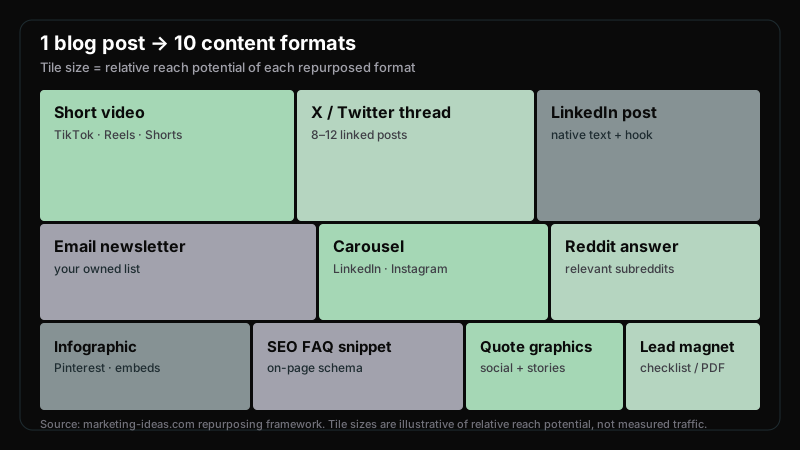
Here's the core system. Take one structured blog post and work down this list. Each format targets a different platform and audience, and none of them require writing something new from scratch — you're translating what you already have.

1. X/Twitter thread. Your H2 sections are already the thread's spine. Turn the post's core argument into a hook (the first tweet), then make each main point its own tweet. Cut every qualifier — threads reward blunt. Lead with the surprising stat or the contrarian claim, and end with a single line linking back to the full post.
2. LinkedIn post. Don't paste the thread here — LinkedIn punishes obvious cross-posting. Instead, pull one section and reframe it as a first-person lesson: "I used to do X. Here's what changed." Short lines, one idea per line, a question at the end to prompt comments. Our LinkedIn content strategy for B2B founders covers the hook formulas that work natively here.
3. Email newsletter. Write a two-line intro in your voice, then link the post with a clear reason to click ("the part on pricing surprised me"). Your list is the one audience you own outright — no algorithm in the middle. If you haven't built that muscle yet, start with our email marketing guide for small business.
4. Carousel / slideshow. Take 6–8 of the post's key points and give each its own slide — one idea, one visual, big text. The first slide is the hook; the last is a soft CTA. These work on LinkedIn and Instagram, and they're skimmable, which is why they get saved. The corporate meme slideshow playbook shows how to make the format land without a designer.
5. Short-form video script. Short-form video is the format 21% of marketers rank as their highest-ROI channel (HubSpot, 2025). Take your single best tip — not the whole post — and script a 30–45 second talking-head or screen recording. Hook in the first three seconds, deliver the one idea, done. Post it to TikTok, Reels, and Shorts. Our TikTok marketing guide breaks down the hook-retention-payoff structure.
6. Reddit / community answer. Find a thread where someone's asking the exact question your post answers. Write a genuine, complete answer in the comment itself — don't just drop a link. If the subreddit allows it, link the post as "I wrote this up in more detail here." Value first, link second. Our Reddit marketing tactics guide keeps you from getting banned.
7. Infographic / chart. If your post has any data — a comparison, a trend, a breakdown — turn it into a single visual. A clean chart or infographic gets embedded, saved, and pinned. You don't need Figma; you need one clear number made visual. (The treemap above is this exact move applied to this post.)
8. Quote graphics. Pull the three punchiest sentences from the post — the ones that stand alone. Set each on a simple branded background. These fill your social feed on days you have nothing new to say, and they're the lowest-effort item on this list. If design slows you down, our Claude AI prompts for marketers get you usable visuals fast.
9. FAQ / SEO snippet. Rewrite the questions your post answers as a tight ## Frequently Asked Questions block — question as a heading, a 40–60 word answer below it. This adds FAQ schema to your page and gives AI assistants and Google clean, quotable passages to lift. It's repurposing your own content back into the post to earn more search surface.
10. Lead magnet / checklist. Compile the post's action steps into a one-page checklist or template. Offer it as a download in exchange for an email, or just link it free to build goodwill. A "how-to" post becomes a "do-it" tool — the same content, now something people keep.
One blog post, mapped to ten outputs
| Blog section | Repurposed format | Platform | Effort |
|---|---|---|---|
| Core argument | X/Twitter thread | X / Twitter | Low |
| One key section | LinkedIn post | Low | |
| Intro + link | Email newsletter | Your list | Low |
| 6–8 key points | Carousel | LinkedIn / Instagram | Medium |
| Single best tip | Short video | TikTok / Reels / Shorts | Medium |
| The exact answer | Reddit / community reply | Reddit / forums | Low |
| Any data point | Infographic / chart | Pinterest / embeds | Medium |
| Best 3 lines | Quote graphics | All social | Low |
| The questions | FAQ / SEO snippet | Your own page | Low |
| The action steps | Lead magnet / checklist | Email / gated | Medium |
How do you repurpose without sounding repetitive?
The mistake is copy-pasting. Pasting your blog intro as a LinkedIn post, then as a tweet, then as a caption reads as lazy, and each platform's algorithm can tell. Repurposing isn't reposting. It's re-native-ing — rebuilding the same idea in the shape each platform rewards.
Three rules keep it fresh. First, change the format, not just the wrapper: a thread is short and punchy, a newsletter is warm and personal, a video is fast and visual. Second, lead with a different angle on each platform — open the LinkedIn post with the story, the thread with the stat, the video with the mistake. Same destination, different on-ramp.
Third, space them out. Don't fire all ten pieces in one day. Drip one format every day or two over two weeks, so a single post fuels a fortnight of presence. That cadence is exactly what a small team can sustain, and it's the backbone of our social media marketing guide for small business. One post in, two weeks of content out — that's the whole trade.

Build it into a checklist and it stops feeling like extra work. Every time you publish a post, run it down the list of ten. After a few rounds, you'll extract eight pieces in under two hours — because the thinking is already done. The blog post did it.
Frequently Asked Questions
How long does it take to repurpose one blog post into 10 pieces?
Your first pass takes 3–4 hours because you're learning the moves. By your third or fourth post, expect under two hours for eight-plus pieces. The core thinking is already in the blog post — you're translating, not creating. Batch similar formats (all quote graphics at once) to move faster.
Won't Google penalize me for duplicate content?
No. Duplicate-content penalties apply to copying text across web pages you control for search manipulation. Posting a thread, a video, or a LinkedIn post isn't that — those platforms aren't competing for the same Google ranking. Just avoid publishing the identical article on two different indexed URLs of your own.
Which platform should I repurpose to first?
Start where your audience already is. For B2B founders, that's usually LinkedIn and email. For consumer or younger audiences, short-form video wins — 21% of marketers rank it their highest-ROI format (HubSpot, 2025). Pick one or two channels and do them well before adding more. Ten mediocre channels beat nothing, but two strong ones beat ten mediocre.
Can I use AI to speed up repurposing?
Yes, and this is where AI actually shines. Feed a model your post and ask for a thread, a carousel outline, or five quote-graphic lines. It handles the reformatting grunt work well. But rewrite the output in your voice before posting — AI drafts read like AI drafts, and platform-native tone is what earns engagement.
How often should I publish net-new posts versus repurpose?
A rough split is one new post to every ten repurposed pieces. Given that 96.55% of pages get zero search traffic (Ahrefs, 2023), pumping out more posts is the low-odds bet. Write fewer, better posts and distribute each one hard. Repurposing is how you get paid for the writing you already did.
Sources
- Ahrefs, "96.55% of Content Gets No Traffic From Google," retrieved 2026-07-03, https://ahrefs.com/blog/search-traffic-study/
- Content Marketing Institute, "B2B Content Marketing Benchmarks, Budgets & Trends 2025," retrieved 2026-07-03, https://contentmarketinginstitute.com/b2b-research/b2b-content-marketing-trends-research-2025
- SparkToro, "Influence Happens Everywhere: An Analysis of the 5,000 Most-Visited Sites," retrieved 2026-07-03, https://sparktoro.com/blog/new-research-influence-happens-everywhere-an-analysis-of-the-5000-most-visited-sites-on-the-mobile-and-desktop-web/
- HubSpot, "Video Marketing Statistics," retrieved 2026-07-03, https://blog.hubspot.com/marketing/video-marketing-statistics
- Animalz, "Content Refresh Strategy," retrieved 2026-07-03, https://www.animalz.co/blog/content-refresh
- Sprout Social, "2025 Sprout Social Index," retrieved 2026-07-03, https://sproutsocial.com/insights/index/