Most marketers open Claude to write copy. Almost nobody uses it for design thinking, and that's the miss. About 75% of marketers now use AI in their work (Salesforce State of Marketing, 2025), yet most stop at text. Claude can't render an image, but it can hand you a brand identity system, three tested ad angles, or a moodboard brief a freelancer can actually build from, before you ever open a design tool.
This guide gives you eight specific prompts, each one a reusable template you fill with your own context. No design background needed. You already have the only inputs that matter: your audience, your business, and your constraints.
Key Takeaways
- Claude produces design briefs, not images: color palettes with hex codes, typography pairings, and visual direction you hand to Canva, Midjourney, or a designer. About 75% of marketers already use AI in their work (Salesforce, 2025).
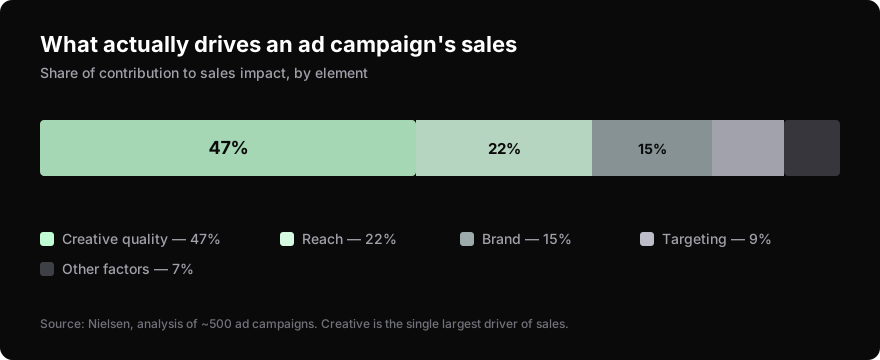
- Creative quality, not targeting, drives most ad performance: roughly 47% of a campaign's sales impact (Nielsen). Generate three distinct angles before producing anything.
- Consistent brand presentation can lift revenue by up to 33% (Lucidpress, 2019). Use the audit prompt to find the gap between what your brand says and what you think it says.
- Specificity beats length. "Sustainable activewear for women 28-40 in cities" outperforms "clothing brand" every time.
- All eight prompts are reusable. Save them, swap your context, rerun when the project changes.
Why use Claude for design if it can't make images?
The bottleneck for most founders isn't the tool, it's knowing what to create. Claude solves that upstream problem. As of November 2025, 88% of organizations use AI in at least one business function, up from 78% earlier in the year, and generative AI shows up most in marketing and sales (McKinsey, The State of AI, 2025). It produces structured design briefs, moodboard descriptions, color rationale, typography pairings, and visual concept explanations specific enough to act on.
Think of Claude as the strategist who briefs the designer, not the designer. The hex codes, font names, and layout descriptions it generates feed straight into a Canva template, a Midjourney prompt, or a freelancer's inbox. McKinsey found creative development is the single most common generative-AI use in marketing, and that's exactly where these prompts aim. The pattern they share: give Claude enough context to produce specific output instead of generic suggestions. That one shift, vague ask to constrained ask, separates usable briefs from filler.
If you're building a broader plan, pair this with our content marketing for founders guide once your visual direction is set.
How do you get a brand identity system out of Claude?
Most AI brand briefs come back vague because the prompt was vague. "Create a brand identity for my coffee shop" gets you mush. Feed Claude your audience, values, and competitors, and you get a system with hex codes and font pairings you can build from the same day.
Act as a brand strategist. I'm launching [business type] targeting [specific audience]. My brand values are [3 values]. My competitors include [2-3 names]. Create a complete brand identity system including: a brand personality description, color palette (with hex codes and usage rationale), typography pairing (headline + body font), logo concept description, and one brand voice example in a social media caption.The output is a brief you hand to a designer or drop into Canva directly. Naming your competitors matters most here. It tells Claude what to differentiate against instead of defaulting to the category average.
How do you generate ad creative concepts that actually test?
Running paid ads on a single creative angle is the most common way small advertisers waste budget. Creative quality accounts for roughly 47% of a campaign's contribution to sales, the single largest driver, ahead of reach (22%), brand (15%), and targeting (9%) (Nielsen, via Recast). Generate three distinct angles before you produce anything, each built on a different psychological trigger.
I'm running a [platform] ad for [product/service]. My target customer is [specific description]. Write 3 distinct ad creative concepts. For each concept include: the core emotional hook, a headline (under 8 words), the visual scene description, and the call to action. Make each concept appeal to a different psychological trigger (e.g. fear of missing out, aspiration, social proof).This works because it forces variation. You get three real directions to test against each other, not three rewrites of the same idea. Hand the visual scene descriptions to a designer or feed them into an image tool as prompts.
Even Meta's own automation backs this up: Advantage+ campaigns, which lean on creative variety, delivered about 22% higher return on ad spend than manually managed ones (Meta data via Top Growth Marketing, 2024). The angle you test matters more than the dial you tune.
How do you build a repeatable social content system?
Posting consistently breaks down when you reinvent the format every time. Claude can design a five-format system you reuse indefinitely, so the decision becomes "which format today" instead of "what do I post." Format choice isn't trivial: Instagram static images average a 6.2% engagement rate versus 3.5% for Reels (ZoomSphere State of Social Media Engagement, 2025).
Design a 5-format social media content system for [your niche] on [platform]. For each format: give it a name, describe the visual layout, specify what type of content fits it, and write one example post. The formats should work together as a cohesive visual brand.You'll get named formats like "Stat Card," "Behind-the-Brief," or "Client Win," each with a layout description specific enough to turn into a Canva template. Build them once and you have a system, not a scramble. This pairs well with a broader social media marketing plan.
How do you write a moodboard brief a designer can use?
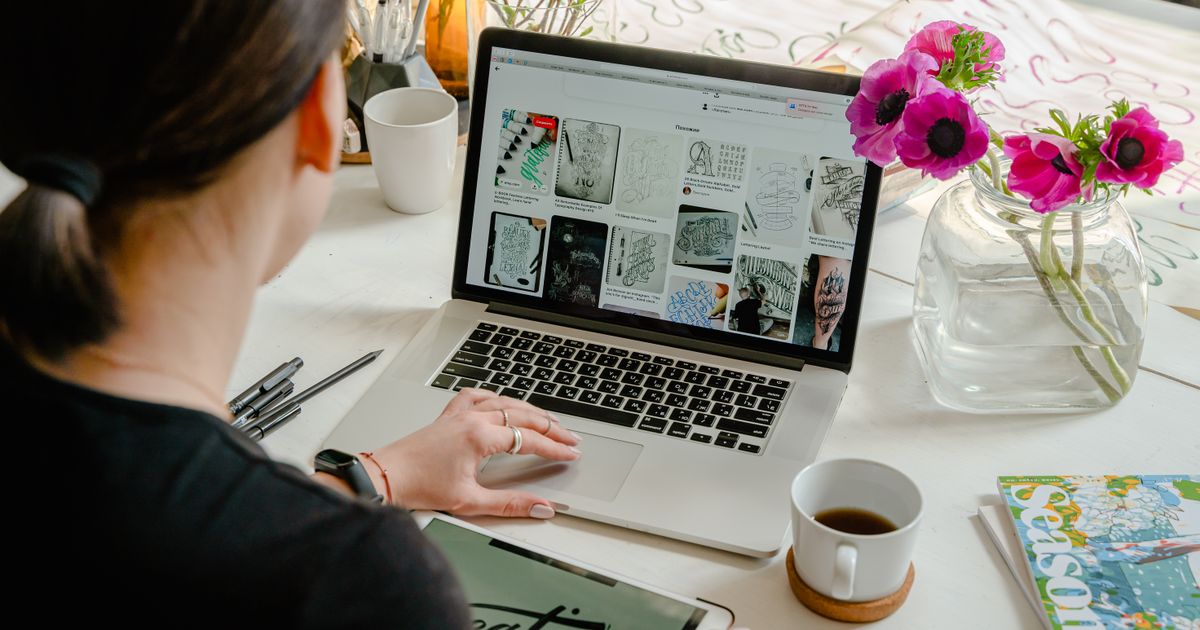
Sending a designer a Pinterest board of random images wastes everyone's time. A structured moodboard brief, with an explicit "what to avoid" section, removes the guesswork designers usually have to read your mind for.

Create a detailed moodboard brief for [project type]. Include: 5 visual references with descriptions (not links), a color mood description, texture and material language, photography style direction, what to avoid visually, and one sentence that describes the overall feeling the design should create.The "what to avoid" line is the most valuable part. Designers spend real hours guessing what clients don't want. Naming it up front saves a revision round and gets you closer on the first pass.
How do you plan visuals for a product launch?
Launches look amateur when every touchpoint is disconnected, the email doesn't match the landing page doesn't match the social posts. Claude can turn a chaotic launch into a sequenced visual narrative with one prompt.
I'm launching [product] on [date]. My audience is [description]. Create a visual content plan for the 2 weeks around launch. Include: the visual theme and its rationale, a color and typography direction, specific visual deliverables needed (with dimensions), and a posting sequence showing which visuals go live on which days.Now you know what to create, in what order, and why each piece fits. The dimensions matter, they let you batch-produce assets instead of resizing one at a time. For the channels around it, see our first 100 users playbook and the 30 places to get your first 100 users list.
How do you break a creative block with Claude?
When you're staring at a blank brief, use Claude as a stimulus, not a solution generator. The trick is one word: "unexpected." Without it, Claude defaults to the most obvious read of your brief.
I'm designing [project type] for [context] and I'm stuck. Give me 5 unexpected creative directions I haven't considered. For each: name the direction, explain the visual logic, describe one specific execution, and tell me what makes it surprising or unconventional.Asking explicitly for surprise pushes Claude off the median of what it's seen. From what we've found, the second or third direction is usually the one worth chasing, the first is still the safe answer. For lower-effort idea sourcing, our guerrilla marketing guide has more.
How do you audit your existing brand visuals?
This prompt is badly underused. Consistent brand presentation can raise revenue by up to 33% (Lucidpress, 2019), and most founders have no idea how inconsistent theirs actually is. Describe your current visuals accurately and Claude gives you an honest audit, including the gap between what your brand communicates and what you think it does.
I'll describe my current brand visuals. Give me an honest audit identifying: what's working and why, what's inconsistent or weak, what the visuals communicate versus what I want them to communicate, and 3 specific changes I can make this week without a full rebrand.

Here's my current brand description: [colors, fonts, logo description, tone, sample post descriptions]
That gap between intended and actual perception is almost always wider than founders expect. The "3 changes this week" constraint keeps the output actionable instead of triggering an expensive rebrand you don't need yet.
How do you build a reusable freelance design brief?
If you hire designers, the quality of your brief sets a ceiling on the output. Use Claude once to build a reusable template for your specific kind of work, and every future hire starts from a better starting line.
I regularly hire designers for [types of projects]. Create a design brief template I can reuse. Include sections for: project context, target audience, deliverables with specifications, visual direction, reference examples format, timeline, and revision expectations. Add guidance notes in each section explaining what information is most useful to include.This is a one-time prompt that saves hours on every project after it. The guidance notes inside the template quietly train you to brief better over time. Founders who hate marketing busywork should also read our organic user growth guide and these SaaS marketing hacks.
Which prompt should you start with?
| Prompt | Use Case | Output You Get |
|---|---|---|
| Brand Identity System | Building visual brand from scratch | Colors, fonts, logo concept, voice example |
| Ad Creative Concepts | Testing multiple ad angles | 3 hooks with visuals and CTAs |
| Social Media Content System | Consistent posting templates | 5 named formats with layouts |
| Moodboard Brief | Design direction for freelancers | Visual references, color mood, avoid list |
| Product Launch Visual Plan | Cohesive launch sequence | 2-week posting plan with dimensions |
| Creative Inspiration | Breaking creative blocks | 5 unexpected design directions |
| Brand Visual Audit | Evaluating current design | Strengths, gaps, 3 quick fixes |
| Freelance Design Brief | Hiring designers efficiently | Reusable brief template with guidance |
Start with brand identity if you're early stage. Start with ad creative concepts if you're running paid traffic. Start with the content system prompt if consistent posting is your current bottleneck.
Four habits make every one of these prompts sharper:
Specificity beats length. "E-commerce brand selling sustainable activewear to women 28-40 in urban areas" beats "sustainable clothing company."
Name your constraints. "We can't use blue, our main competitor owns it" produces output that respects real limits.
Ask for rationale. Add "explain the reasoning behind each choice" and you get the thinking, which you can evaluate and edit.
Iterate in the same chat. If the first pass is 70% right, say what's off and ask for a revision. The second pass usually beats starting over. Marketers expect generative AI to save them roughly five hours a week (MarketingProfs, 2025), and this is where that time comes from. Want a deeper system? Our AI marketing stack breakdown shows how these prompts chain together.
Frequently Asked Questions
Can Claude generate images for marketing?
No. Claude produces detailed design briefs: color palettes with hex codes, typography pairings, and visual concept descriptions. You take those outputs to Canva, Midjourney, or a designer for the final execution. The brief is the value, not a rendered image.
Which design prompt should I start with?
Brand identity if you're early stage. Ad creative concepts if you're running paid traffic. The content system prompt if consistent posting is your current bottleneck. Each prompt is reusable, so you can run the others as the project evolves.
How do I get better results from design prompts?
Be specific about your audience, name your constraints (like "we can't use blue, our competitor owns it"), ask for the rationale behind each choice, and iterate in the same conversation instead of starting fresh. Specificity moves Claude off generic, average output.
Are AI-generated design briefs good enough for professional designers?
Yes, as a starting point. McKinsey found creative development is the top generative-AI use in marketing (McKinsey, 2025). A structured brief gives a designer clear direction from day one, which is exactly where most projects stall. It won't replace execution on complex assets, but it removes the blank-page problem.
Can these prompts replace hiring a designer?
For early-stage strategy and direction, largely yes. For final execution of complex visual assets, no. The prompts give you professional-grade briefs that save hours whether you build it yourself in Canva or hand off to a freelancer.
Sources
- Salesforce, State of Marketing Report (10th ed.), 2025. ~75% of marketers have adopted AI in their work.
- McKinsey, The State of AI, November 2025. 88% of organizations use AI in at least one function; creative development is the top gen-AI use in marketing.
- Nielsen, analysis of ~500 ad campaigns. Creative quality drives ~47% of a campaign's sales contribution (via Recast).
- Meta performance data, 2024. Advantage+ campaigns delivered ~22% higher ROAS (via Top Growth Marketing).
- ZoomSphere / Socialinsider, State of Social Media Engagement, 2025. Instagram static images average 6.2% engagement vs 3.5% for Reels.
- Lucidpress (now Marq), brand consistency study, 2019. Consistent branding can increase revenue by up to 33%.
- MarketingProfs, 2025. Marketers expect generative AI to save ~5 hours per week.